Streaming a LiDAR point cloud in the browser
A viewer for 50 frames of autonomous-driving LiDAR — 8.5 million points — streamed, decoded off the main thread, and rendered at interactive framerates. Built for a Scale AI code challenge.
The demo needs a desktop browser — the camera is keyboard-driven, and a full playthrough streams roughly 66MB of point-cloud data.
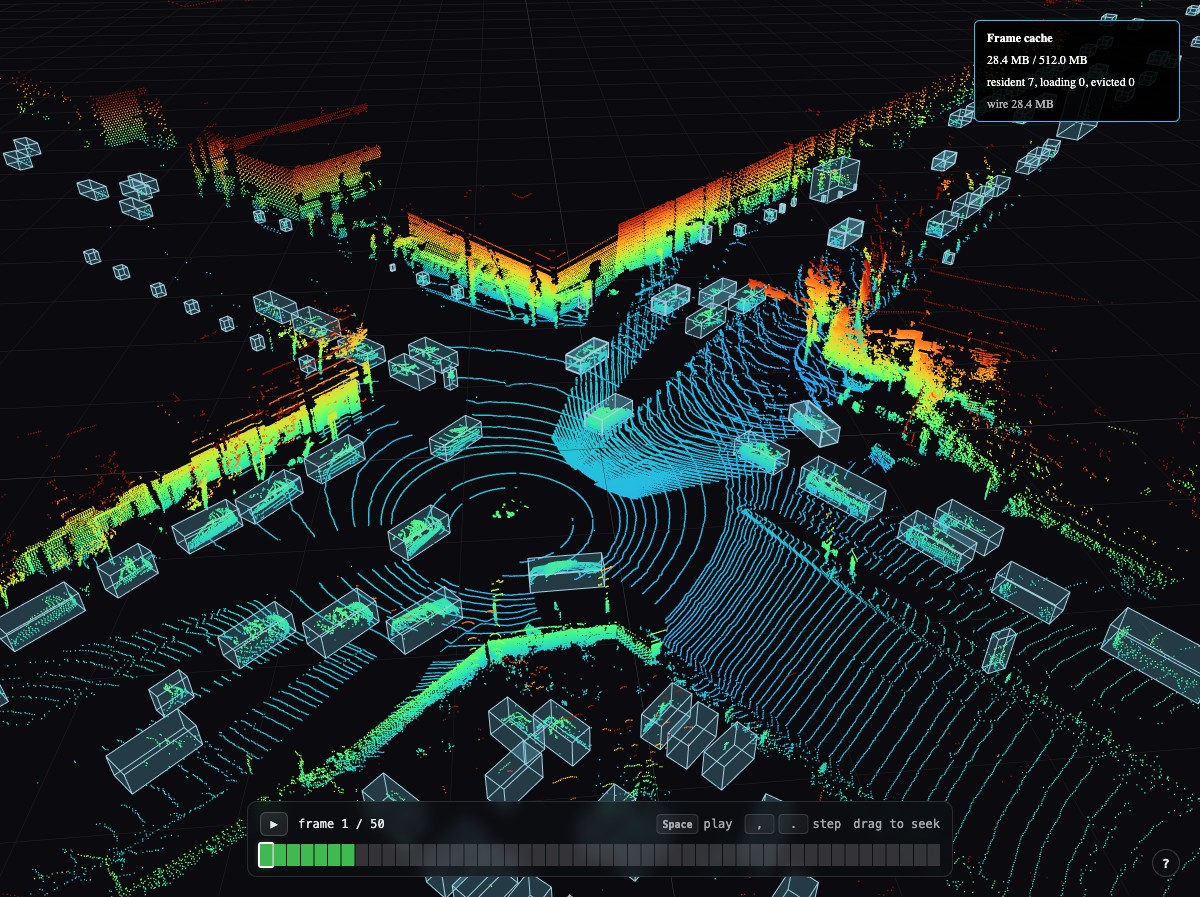
The dataset is a 50-frame sequence from PandaSet: 8,562,943 points and 7,748 annotated bounding boxes, captured from a car driving through San Francisco. Each frame arrives as 4.27MB of JSON — a flat array of [x, y, z] triples — which compresses to about 1.3MB on the wire. Decompressed, the full sequence is a little over 200MB.
That size is the whole problem. You cannot hold every frame in memory, and you cannot run JSON.parse on 4.27MB of text on the main thread without visibly dropping the frame you are already rendering. Scrubbing the timeline has to feel immediate anyway.
Getting the parse off the main thread
Frames are fetched as raw ArrayBuffers and handed to a pool of Web Workers — sized to cores - 1, clamped between two and four — which decode the JSON and pack the result into a typed array. What comes back is transferred rather than copied, so a decoded frame never crosses the thread boundary twice.
The pool dispatches nearest-first: when a worker frees up, it takes whichever queued frame sits closest to the frame you are currently looking at. Dragging the timeline changes the target, and in-flight work reorders itself around wherever you land rather than finishing the queue it started with.
Every frame is recentered against the offset of frame zero. Without that, each frame is positioned in its own sensor-local coordinates and the scene appears to jump between frames.
Keeping the working set bounded
Resident frames live in an LRU cache keyed by recency of access, so scrubbing back and forth through a window of frames stays warm while the ones you have left behind get evicted. The cache tracks four states — resident, loading, evicted, absent — because the UI needs to distinguish "not here yet" from "here and gone," and a heads-up display in the corner exposes the whole thing while you interact with it.
Coloring on the GPU
Points are colored by height through a custom vertex and fragment shader pair rather than by writing per-point colors on the CPU. The vertex shader also handles point sizing against device pixel ratio, so points stay legible on a Retina display without becoming blobs on a standard one.
Camera movement is a keyboard rig rather than orbit controls — the scene is a street you drive through, not an object you inspect from outside.
Built with React, @react-three/fiber, and Three.js, bundled by Parcel into a 974KB entry.
The point cloud data is from PandaSet by Hesai and Scale AI, licensed under CC BY 4.0.